If you convert an existing ASP.NET MVC 3 application to ASP.NET MVC 4, any new area you add to your project will throw a compilation exception about System.Web.Optimization on every view or partial view in the area. To fix the problem, simply remove the add element for namespace=”System.Web.Optimization” from the area’s web.config or install the Nuget package if you want to use the bundling and minification optimization feature in MVC 4.
Author: Tom Cabanski
Software Developer and Entrepreneur
TeamCity 7.1 Branch Builds Rock
I’ve been using TeamCity as my CI server of choice for years now because the folks at JetBrains just keep making it better. Branch builds are just another example of the kind of thoughtful goodness I have come to expect from these guys.
It’s all designed to fix a problem that occurs when a team takes advantage of the power of a DVCS system like Git or Mercurial. When a developer starts working on a feature, he or she makes a local feature branch that gets pushed to the main repository periodically. Once the feature is done, the branch is merged into the main development branch. Traditionally, the CI server is configured to build the main development branch. That means developers lose the benefit of all the checks the CI server does whenever they are working on a feature branch.
It gets even worse when you have multiple team members collaborating on feature branches or working on closely related feature branches. For example, Mark checks in Feature X that Mary would like to merge with her work. The problem is she has no way to know the code in Feature X passes tests or even compiles before she pulls it down to her local machine. If it is broken, she ends up wasting valuable time on something she probably should not have tried to merge in the first place.
TeamCity solves this by allowing you to setup your configuration to automatically build all or selected active branches without treating them like they are supposed to be stable. Although TeamCity shows their status, broken feature branches do not impact the overall project status; As long as the main branch builds and passes all tests, the project status will still be good.
Setup could not be easier especially if you just want to build all feature branches. You simply go to the VCS root and configure which branches you want to build as shown here:
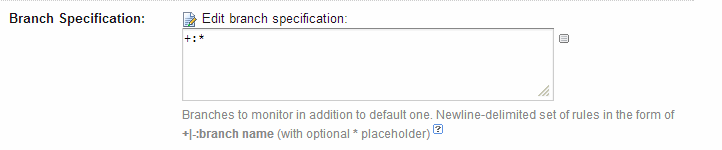
The specification “+:*” tells TeamCity to build all branches automatically.
Once you do this, you’ll start seeing branch names next to the builds on the main screen. You can also see a screen with a summary of the state of each branch like this:
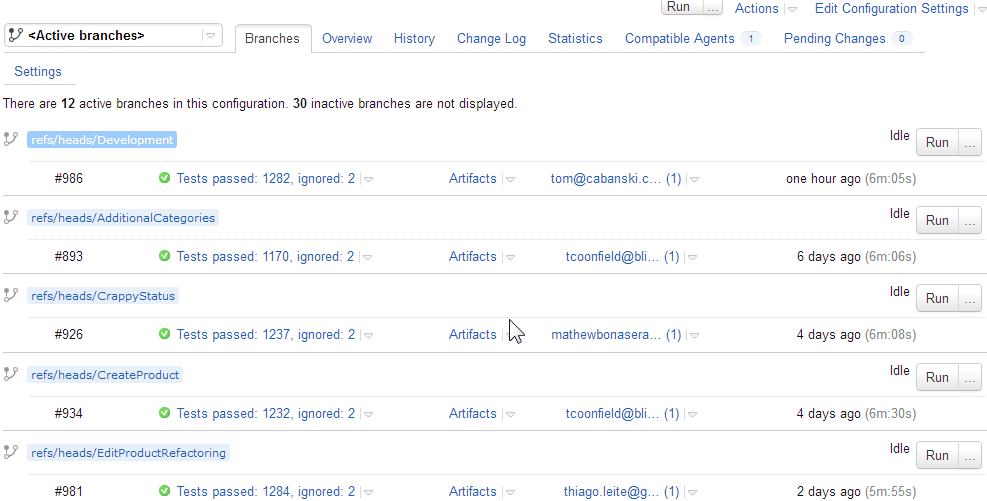
Very useful indeed.
TeamCity Professional is free if you have fewer than 20 build configurations. It includes three free build agents. If you need more than 20 build configurations or you need Active Directory integrated security, the Enterprise edition is $1,999. Additional build agents cost $299 each. You can see the complete price list and license details on the TeamCity web site.
Tablet Wisdom From the Mouth of Babes
My twin boys are now 16 month old and are both avid users of the various tablets we have in the house. Since I’ve been experimenting with tablet development, we have an iPad, a 10″ Motorolla Xoom (Andorid 4.1), a 7″ Nexus Table (Android 4.2) and, because my wife couldn’t resist a bargain, a 10″, discontinued HP TouchPad (WebOS) so there’s plenty for them to choose from. Here are some random things I’ve observed about how they’ve learned to use the tablets, what they do with them and how it seems to have impacted their development:
- For awhile, one of the boys liked to watch a little Baby TV before bed. Now he would rather sit and browse through YouTube. The bottom line is he would much rather watch what he wants when he wants it.
- YouTube occasionally gets stuck on the iPad. Gavin has learned how to fix this by refreshing the browser. Grant comes to me or his mom and says, “iPad hang” and hands it to us so we can fix it. Both my boys also know words like “reboot”. It’s kind of sad to realize these things are still pretty unstable despite their apparent level of sophistication.
- Grant wanted to sit in my lap while I was working so I fired up YouTube on one of my monitors to play his favorite song. When it was over, he reached up to the screen and tried to swipe to browse the list of related videos. Of course, that did not work, which caused quite a bit of frustration. Showed him how to use the mouse, but he just didn’t get it. Even babies know direct manipulation is the best!
- The boys don’t care which tablet they get as long as it has the software they want. If Gavin wants angry birds, he’s equally happy with the Nexus, the iPad or the TouchPad. Unfortunately, the TouchPad doesn’t have much except for Angry Birds so it’s getting used less and less. It also means that for the most part the Nexus and iPad are equally popular around our house.
- Gavin saw me watching a video on the Nexus with sound coming from some Bluetooth speakers a couple feet away and spent a good five minutes trying to understand how the sound was coming from way over there. From his perspective, it seemed like magic.
Watching them I am reminded how far this technology has come despite its flaws. My first full-time job writing software was for a client that sold car phones, pagers and two-way radios. When the first portable phones came out, maximum talk time was less than 60 minutes and you hauled around a ten pound bag with the battery. Even rich athletes had to be careful about using their cell phones or they would run up airtime bills that ran into the tens of thousands. Now my kids are watching videos posted by people in China on tiny devices with 10 hours of battery life on a lighting-fast Internet connection with no limits on usage that costs me less than $50/mo. Back in the 80’s, I had to teach my dad how to deal with directories and the DOS prompt. Now my kids are daily consumers of technology that can’t use a mouse, have never touched a keyboard and don’t even care about the OS. I guess Gavin is right. It is magic!
NCover4 Gets a Little Faster (and Hopefully Will Stop Hanging)
This is the second of several posts based on my experience using NCover4 on a large, new development project. Click here to see all the updates in order.
Yesterday, I installed the latest upgrade to NCover4 (version 4.1.2078.723). NCover support tells me that their developers found and fixed a thread deadlock that was causing the hanging build issue we observed on several occasions. They also significantly improved the performance of the screen used to view the list of coverage results for a project. Now it draws the main part of the screen in about 30 seconds. Still a little slow, but considerably better than the many minutes it used to take. I will post a more complete update after using this release for another week or two.
NCover4 — Could Be a Good Product Someday
This is the first of several posts based on my experience using NCover4 on a large, new development project. Click here to see all the updates in order.
My team has been using NCover4 the last several months and I must say I have mixed emotions. I think it could be a good product — someday. The problem is right now it has all the rough edges of an early beta with the high price of an enterprise-ready development tool.
So how about what’s good? Well, let’s start with Code Central, their centralized web server. The idea of it is pure genius. All your test results can go there whether they are run at developer stations, the build server or manually by your QA testers. It tracks trends. It tracks line coverage, branch coverage and provides a number of other interesting metrics like CRAP scores. It lets you drill down into the details of any run. It’s even reasonably easy to configure.
Unfortunately, like most things in NCover 4, the implementation has some pretty significant flaws. The web user interface is pretty but ridiculously slow. We’re talking minutes to finish drawing a page-worth of coverage stats. Drill downs are not much faster. Installation with defaults is easy, but step outside of the defaults and your are in for a painful experience. Want to install to the D drive? Well, you’d better crack open the command line. Version upgrades, which they claim are automatic, have been hit and miss. Sometimes they work. Sometimes they don’t. You quickly learn to allocate a few hours to each version upgrade.
So how about the desktop? Well, it’s a web application too, which is kind of strange. It works about the same as the server. Low-overhead coverage, reasonably easy to configure but slow as heck to draw each web page when you have recorded more than a handful of results. It can manage and use configurations from the server, which is very nice feature. It can send test results to the Code Central server as well.
The Visual Studio plugin, included with the desktop, has promise. When it is working, it highlights lines in your code with coverage information. But it too seems unfinished. It behaves strangely at times. It causes error dialogs in Visual Studio periodically. It just doesn’t seem quite ready for prime time.
As far as build server integration goes, it is again a story with lots of promise and spotty results. Because of the way it works, you really don’t integrate it with the build server; Rather, you run the collector at the build server just like you run the collector anywhere else. We use TeamCity and once we switched to running NUnit instead of TC’s built in test runner, NCover4 was able to capture results. The latest couple of NCover4 versions periodically hang our build when tests start running. When this occurs, the NCover4 service cannot be stopped. Instead, we have to set it to manual start and then reboot the server. As long as we let one build run without coverage after the boot, we can then startup the NCover4 service and it works again for awhile.
That brings up the subject of support. It’s friendly and professional but hamstrung by the product. The bottom line is our typical down time when we have a problem is measured in days rather than hours. Early on, licensing for the desktops stopped working. We had to wait more than a week for a release to fix the problem. At one point, coverage stopped working all together. We spent hours over several days running utilities to capture information for support to examine only to arrive at the solution of doing a clean install, which, of course, lost all our history in the process. On average, NCover has been partially or completely down two days out of each of our ten day sprints.
In summary, NCover4 is currently early beta quality — full of bugs and lacking the polish of a finished product. Given time, it can be very good and worth every penny of its price. If you have the time to deal with the flaws, it might be worth a try in your project. However, be prepared to spend significant time and effort to keep it running.
Taking a Day Off Work to Have Some Fun
Our agile team sometimes makes a conscious decision to work a little harder in week one of a two week sprint so that we have more time in week two to review upcoming design issues with our user base. The other hope is that we can work a little less in week two to balance out to a truly sustainable pace. This was one of those sprints. In fact, it went so well that I was able to take today, the last day of the sprint, off.
So what am I doing on my day off for fun? Why, I’m working on a little side project I’ve been tinkering with the last month or so using node.js and other technologies that have nothing to do with my .NET-focused job.
I’m a good programmer mostly because it’s one of the things I do just for fun. It’s been that way ever since I discovered programming using punch cards on an IBM 1620 back in high school. Nothing floats my boat quite like creating cool or useful applications. I consider myself lucky in this way. I enjoy going to work almost every single day at least as long as I don’t let myself drift into mostly hands-off management roles.
Now there’s a serious side to what I am doing too. I believe that programmers have a responsibility to keep themselves current. I have absolutely zero sympathy for those who fall behind because they claim their employer did not provide training and other resources to help them keep up. I’m not saying the employer should not help out. When I owned my own company I made sure to help my employees stay up to date. However, if you find yourself stuck in a dead-end job, you have only yourself to blame.
So how do you get out if the skill you use at work every day is not in demand? Well, you get skills that are in demand and you do it in a way that lets you demonstrate those skills. You can take all the classes you want and get certified but that’s just not very impressive. You need to put your skill to work. One way to do that is work on an open source project. There’s thousands out there right now that need help. Heck, in my experience almost all open source projects would love some help. Another option is to put together a reasonably substantial application of your own, host it online for pennies and put the source on Github so you can show it off to potential employers. Nothing says competent developer more than an impressive application and the ability to discuss the implementation intelligently and passionately.
Top Ten Reasons to Avoid Taking Advanced Distributed System Design with Udi Dahan
10. It’s too expensive
$2,500 is way too much to pay for a one week training course with 50 or so other people. Besides, you don’t even get a t-shirt.
9. You want detailed implementation advice
If you want to see lots of code samples and hands-on coding, this is not the place for you. If you have a laptop, leave it at home or at least in the trunk of your car. You’re not going to need it. Instead, bring an open mind.
8. You like to surf the Internet during the “boring parts”.
Parts of the lecture can seem a little dry especially if you figure Udi is just setting the stage for the good CQRS implementation stuff coming later. Unfortunately, if you tune out for more than a few seconds, the odds are you’re going to miss something pretty important. If you want to pretend to take notes on your laptop, that’s fine. However, as Udi points out, it’s better to take notes with an old-fashioned pen and paper.
7. You are a DBA
If you break your distributed system into small, autonomous components, you really don’t need a centralized database. Udi utters this heresy more than once. To make matters worse, he says the database is a black hole of undesirable coupling. Do I need to say more?
6. You are a senior programmer, distinguished engineer, application architect or any other kind of lofty programmer that prides himself on writing clever code
If you break a distributed system into small, autonomous components, code gets simpler. We’re talking methods with two lines of code. We’re talking projects with a single class. You could write this stuff in straight Basic without much worry. No tests, no big problem. Poor implementations can be corrected in a few minutes. Even maintenance programmers can understand the code! There are a couple of juicy bits that require an expert, but fewer than you think. Did I mention that code gets much simpler?
5. You are the go-to guy for distributed caching
Have you ever saved the day with an in-process cache or even a distributed cache? Well, Udi shows you where you went wrong and how you could have done it much better by letting the Internet do the work for you.
4. You believe in implementing “best practices”
Udi shows you why there is no such thing as a best practice. He gives you plenty of examples that will help you understand that it really always depends; You should use the simplest possible approach that meets the real requirements.
3. You dig monster trucks and like to go mudding on the weekend
If you love code reuse, centralized OO domain models, ORMs like NHibernate and centralized databases with perfect relational integrity, you probably don’t want to go to this class. Udi will show you how these seemingly desirable things can help you turn your system into a big ball of mud.
2. You want to “do CQRS” in your next system
Udi spends a long time telling you all the reasons you don’t need CQRS. He even says it is neither a “best practice” nor a top-level architectural pattern. Hasn’t this guy heard the distributed podcast?
1. You want Udi to bless the architecture of your latest project
Unless you’ve gone to the course before, I doubt you’ll come out of it feeling good about everything in your latest system. You will feel dumb at times. Whatever you do, don’t bring your boss!
If you want to learn more about what the course is like, you might want to read my series of impressions.
Advanced Distributed System Design with Udi Dahan — Part 4 — Go Forth and Make Things Simple
You can find part 1 of this series here.
Day three started with the group exercise on the hotel problem. We broke up into groups of seven and gathered around white boards to discuss service boundaries and messages. The experience was both enlightening and depressing. Our group began listing various use cases and what data was involved in each. We identified a couple of service boundaries and named them: Room, Guest, Pricing, Billing. We then started arguing over the first couple of screens. Service changed names. Then more and more responsibility started to converge in the renamed Room Management Service. It knew about room inventory, it knew about the guest, it knew about the reservation and it handled the front desk. A couple of us started to point out that the service was getting too big about the time Udi walked over and started to talk to us. He reminded us that hotels overbook and have processes to help guests that happen to show up when no room is actually available. After all, guests cancel hotel rooms all the time. He answered a couple of questions, glanced at the whiteboard and then wandered off to confuse the next group.
We continued running around in circles for the entire 45 minutes or so we were given for the exercise. We’d break up things into smaller service and then start pulling things back into a giant uber-service. We squabbled over the service names. We’d look at the screen and think one thing; We’d look at the data and think another. With 10 minutes left we scrambled to draw a sequence diagram to at least understand the message flow. We accomplished absolutely nothing. Seven smart, experienced system architects full of new Udi knowledge couldn’t come up with even the beginning of the service breakdown for a simple reservation, check in and check out system with about three screens in total. It was frustrating in the extreme.
The mood and discussions during the break that followed were bleak. Analyzing a system this way is hard! Many of us murmured the unthinkable. Maybe we just weren’t capable of it. Others took refuge in what they knew worked before they came into the class. They murmured heresy of their own. Perhaps this SOA stuff doesn’t work. After all, not everyone in the community agrees with Udi. Maybe he’s not as smart as we thought. Everyone knows you shouldn’t build a system without a central database and all-powerful RI. Maybe Amazon does stuff this way, but we’re not Amazon. I can build a great layered architecture that will work and scale just fine. Maybe we need some message and services, but we can do that without breaking the system into tiny little services. Besides, did you get his nutty suggestion for the project structure? Heck, did you ever look at the NServiceBus source code? I mean how are you going to manage hundreds of little projects, some with only one class. Now that’s complex. And on and on it went.
After the break, Udi explained that the point of the exercise was to help us understand what is involved in SOA analysis. He pointed out that we had to talk to the business in a slightly different way to tease out real requirements. He then gave us ideas and tools we could use to help get us started. Although there is no step by step guide to doing a good analysis, there are certain things to avoid. Don’t name your services. You probably will get the name wrong at first and that will lead you to group the wrong things into the service because the name will insist you do so. Help your users get past their assumptions about computer systems because that impacts how they communicate requirements. Help them focus on the underlying requirements by asking “why”. Why do we need a preferred customer flag? What do we do with preferred customers? How do they become preferred? If we give discounts to preferred customers, what are the rules? Will they change in the future? Have they ever changed in the past?
By the time we hit our next break I was certainly feeling better. I had started to truly understand that SOA requires a different mode of thinking. It was going to take time to master it. I knew that Udi could not give me answers; Too many of them would be “it depends” anyway. Instead, he was going to help me understand how to start asking the right questions. It was almost like one of those old Kung Fu movies — wax on – wax off, cook blindfolded or snatch that stone; At first you don’t even understand where the lessons are leading and then one day the light dawns. The master must empty the student of the old ways before starting to teach the new. One idea and some practice leads to the next and the next and the next until the student realizes that mastery is nothing more or less than an understanding of how to practice and continually learn.
Udi spent the rest of the course setting us on the path to enlightenment. He delved a little into details here and there, but for the most part the course was about ideas both big and small. By day 4, every time Udi mentioned “best practice” there would be a ripple of giggles in the room. On day 5 it dawned on me to start tweeting some of the funniest: “Best practices are like cargo cult” and “It’s a best practice, (pause) that’s how you know it is wrong.” were two of my favorites. By the time 4pm on Friday rolled around almost everyone was dreading the end. There were so many questions. There was so little time left.
The final discussion was ostensibly about how to make your web tier scale. In typical Udi fashion, he started by illustrating how wrong best practice can be. He illustrated the fallacies that drive the move to in process and distributed cache. He discussed real-world examples of how caching can actually reduce performance under load. He talked about how one client he advised removed the cache and got a 30% increase in performance. He did not suggest that caching never works. He just made it clear that it is not the magic bullet it might appear to be.
He then turned the discussion towards all the caching available in the web itself — the local browser cache, the ISPs cache and CDNs. He showed us how easy it is to take advantage of these things to lower your web traffic and improve scalability. In the end, it was clear that he was really showing us how to stop building applications that simply use the web as a transport mechanism and instead build applications that live mostly inside the web. He was once again challenging us to think in a new way.
I learned so much at the class it’s going to take me awhile longer to fully absorb the experience. It was undoubtedly worth the price. It’s the best professional training course I’ve ever attended. I haven’t felt this excited about building software since I discovered punch cards and Fortran.
The flip side, the scary side, is there is so much to learn. 2/3 of our team really wants to bring true SOA to our greenfield project. Even though coding does not start in earnest until March 1, we’ve gathered most of the high-level requirements and written a fair amount of code we thought was pretty close to done. If we go SOA, we have to redo some of the analysis and some of the code. We would also be taking a huge risk because none of us have ever actually built a system this way. We’re just not sure it is a good idea. We’re going to take advantage of Udi’s Architect Hotline to get specific advice about how we might proceed. I have a feeling we are going to have to stick with the architectural approach we have at least for phase 1.
For me personally, it’s a little different story. I have been working on some ideas for a hosted product that I plan to develop in my spare time. There is no doubt in my mind that it will be built on an SOA. There’s even a couple of areas in it that will benefit from CQRS.
I think transitioning myself to SOA is about as important as the transition I made from mainframe to PC-based client/server back in the 80s. The mind shift reminds me of the mindshift required to go from procedural programming to OO. I heard the same kind of resistance from some of the experienced architects in the room in Austin that I had heard from some of the old hands in the mainframe COBOL shops that were my home back in the day:
- It might work sometimes, but not in the general case.
- Layered architectures are proven. SOA is not.
- I can find all kinds of programmers that understand layered architectures. If I go SOA, I won’t be able to find help.
- The business won’t understand SOA.
- There’s no way the business will accept any kind of eventual consistency.
- The business can’t live without a monolithic relational database.
I can list tons more items, but you get the point. They all boil down to one simple argument: “It’s different and, therefore, scary.” I would argue that what is really scary is how easily a beautiful layered architectures turn into a big ball of mud in a relatively short period of time. What’s scary is how all the RI in the world throws away flawed data without any consideration for its business value. What’s scary is how 20 years of OO, patterns, unit testing, dependency injection and the application of solid principles like DRY have left us with the same big balls of mud we were building back in 1990.
SOA is all about applying the single responsibility principle, which good OO was supposed to embody and so rarely does, to the business domain. Once we do that, it might actually be possible to build flexible, scalable, highly maintainable systems. It’s about enforcing business policies in the domain model instead of trying to model the business there. It’s about letting the infrastructure do the heavy lifting. It’s about building systems that are “of the web” instead of just on the web. It’s about writing less code with more thought. It’s about making the actual implementation simple. I guess that’s why Udi calls himself the “Software Simplist” .
If you get a chance, go to this course. If your employer won’t pay for it, take vacation and pay for it yourself. What more can I say?
Advanced Distributed System Design with Udi Dahan — Part 3 — Heresy!
You can view part 1 of this series here.
Day two opened with an easy module on the bus and broker architectural styles. It was part history lesson and part rationale for what was coming next. Message brokers were an attempt to solve the enterprise software integration problem. The idea was to centralize integration concerns to make it easier to connect all your partners and internal systems. In time, they grew to become central repositories for business rules too. Much of that logic took the form of scripts — lots and lots of scripts. Unfortunately, all that code started to become a proverbial big ball of mud. It just didn’t work.
The bus architectural style, on the other hand, simply allows event sources and sinks to communicate. The bus is just a highway. It doesn’t attempt to route or centralize anything. There is no single point of failure. It is simple.
Unfortunately, the simplicity of the bus comes with a price; It is more difficult to design distributed solutions than centralized ones. I guess that’s why I am at the class.
The second module of the day introduced SOA and started to delve into the real challenges of distributed system design. Service are the technical authority for a specific business capability. All data and business rules reside within the service.
The most difficult aspect of distributed system design is figuring out what services you need. Udi illustrated this point by leading the class through an analysis of the Amazon.com home page. The idea was to figure out what services the home page used. I was surprised by just how many services were involved and how small some of them turned out to be. For example, one service was responsible for the product description and image, but there was another service for price.
The next interesting thing was the idea that a service is not just something you call. It actually extends across all layers of the application from GUI all the way to the data store. That means that the price service is responsible for displaying the price on the Amazon page. There can’t be a display page service because the price service isn’t willing to give control of its data to another service. How does it know that the display page service won’t change the price before displaying it?
The fact that each service owns its own data also challenges the notion that the system has to have one central database. If there is a central database, relational integrity rules cannot stretch across service boundaries. In fact, when you do services right, many of them, maybe even all of them, don’t need a database at all.
Udi’s heresy was shocking but attractive. How can we live without a central database for our systems? How can we live without database RI? Is it really OK to use something else for OLTP and just create a “real” database for OLAP later? Imagine how scalable the system can be once it is not tied to the big database in the middle. Imagine how much easier and less risky it becomes to roll out small, incremental changes when you don’t have to worry about updating the schema in the central database.
The day ended with a homework assignment to identify the service and messages involved in placing reservation and handling guests at the front desk of a hotel. At least at first glance, it didn’t look too hard. Stay tuned to find out how wrong I was.
You can view part 4 of this series here.
Advanced Distributed System Design with Udi Dahan — Part 2 — Setting the Stage
You can find part 1 of this series here.
I can say for sure that the course has lived up to its reputation so far. I can also say that Udi is well prepared and practiced. As expected, he had mastery of the material. However, unlike some technical presenters, his presentation was very polished. The material was broken into units that run about an hour and a quarter so we got breaks on a regular basis. He built a time and place for questions into his presentation and answered them well. His slides weren’t much to look at, but the information behind them was very good. He used a whiteboard to illustrate some concepts. At times, he also asked questions to engage the audience and used their answers to lead into his next point. The pace was just a little slow for me at times, but that’s because I’ve been practicing some of these architectural ideas myself. Overall, I would say his pace was a reasonable compromise for the audience.
For the first half of the day, Udi lead us through the back story. He started with a module that discussed the ten (actually 11 — computers start counting at zero right?) fallacies of distributed computing. The first hour or so passed quietly for me. I know the network isn’t reliable, I know latency is a problem, I know bandwidth is a problem etc. I’m not saying the material was boring. There was plenty of interesting detail I didn’t know, like exactly how little bandwidth is actually available on gigabit Ethernet, but none of it made me uncomfortable.
However, when he got to the last fallacy — “Business logic can and should be centralized” — I felt it a little in my gut. He made the point that code reuse was originally based on the false premise that the best way to improve developer productivity is to reduce the number of lines of code a developer writes. After all, the design is complete and all programmers have to do is type in the code. Of course, that is false. Is code reuse more important than performance or scalability?
He wrapped up the first module by stating a theme I suspect he will repeat: “There is no such thing as a best practice”. No solution is absolute. If you optimize to reduce latency, you usually end up using more bandwidth. If you make code reuse your god, you will end up compromising on other aspects of your system. You have to find a balance for each situation.
The second module, “Coupling in Distributed Systems”, dug deep into the old adage that you want your components to be loosely coupled. For example, if you have a common logging component that has no callers, it is loosely coupled. Is that a good thing? No, it would be unused code. The truth is different kinds of components should have different kinds of coupling. He illustrated that brilliantly with an audience-participation exercise that had us voting on generic components with various levels of afferent (inbound) and efferent (outbound) coupling. He then delved into the the three aspects of coupling — platform, temporal and spatial — and how they each could impact the performance and reliability of your system. His discussion on how a slow web service under load could end up bringing down a system, or at least making it look unreliable to users, was quite interesting. He used that example to introduce the concept of reducing temporal coupling using messaging.
The final module of the day, messaging patterns, started to explain the benefits of messaging in some detail. Although RPC is faster and lighter-weight to call, especially if you ignore potential network issues, messaging is more resilient and scales better. He spent a good hour going through typical failure scenarios to show how messaging protects you from losing data when a web server crashes or a database sever goes down.
He made the point that transactions can give you a false sense of security. Imagine a user is placing an order. The database server has a problem and rolls back the transaction. Although the database is consistent, you’ve lost an order. Can you get it back? Probably not. He showed us several examples using NServiceBus to illustrate some of his points. His demonstration of replaying messages from the error queue was especially good.
It looks like we’re going to start digging into SOA on Day 2. Should be fun.
You can find part 3 of this series here.
 Tom Cabanski
You must be logged in to post a comment.